Last night, I finally had a chance to sit with a developer and try and style something inside of an Adobe Air application, using Flex 3. I have about 1 hour of that under my belt. Here is what I learned so far:
Flex 3 is a mess for styling.
In HTML, I feel like I know what is going on. HTML/CSS/JavaScript, Server-Side logic, the DOM tree…I get it. Firebug makes it easy to see. I understand the separation of tiers. With Flex, I was instantly lost. There were several different files, each of which was responsible for different parts of the style. Sometimes it was CSS syntax with new fangled Flex attributes like HorizontalAlign: center. Other times it was configuration in programming like HorizontalAlign = “center”. Sometimes you needed 40 and other times 40px. Even though the programmer had intellisense, we were guessing half the time on how to do a certain style. The model is messy and I couldn’t find clear documentation on how to do what I wanted. When you google for help, you get a variety of formats. Pages like this are very hard to parse or find something specific. MSDN, Mozilla, W3C all do a better job of defining what is possible.
Apparently, Flex 4 is a re-do of this issue. I tried to convince the team to use Flex 4 right from the get-go, but that didn’t work. So I am stuck with Flex 3 until later in 2010.
Goodbye cross-browser testing.
Let’s assume you have an application that does not require any form of SEO for Google. And let’s assume you can learn enough of AIR to make an application install. Last assumption: The application is just a reference to a URL. What have you just done? You have delivered a web application to a customer that only needs to be tested in Webkit. You can build the application anything you want, jQuery, ExtJS or whatever. The application launches the application in a window with no chrome in webkit. It’s fast and looks great. I was stunned at how quickly that worked. I wish we tried this at Marketo. It would eliminate ALL cross-browser testing and make the application twice as fast. It seems a no-brainer to do this for all kinds of applications in this category.
But something is screwy.
Look at the image below. This is AIR pointing to a webpage and Chrome also pointing to the same web page. Notice the selectbox.
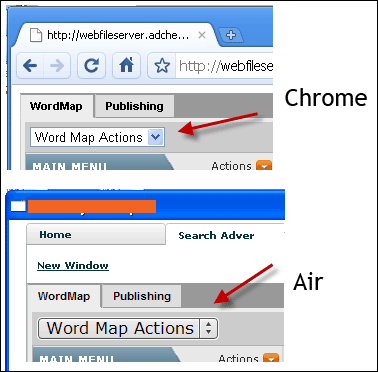
Why did AIR completely change the select box? It’s supposed to be Webkit insde AIR. What else is it changing? Does this mean I can’t test in Webkit in Chrome? I have to test the HTML inside AIR? This is completely disconcerting. I need to know what else changes. If I had to guess, I think that the form controls like select, input, checkbox, radio buttons are all going to change. I need to do more testing to see if this is the case.
Summary
Ultimately, AIR and Flex are kinda black boxish. They are doing things that are not crystal clear. The learning curve is much steeper than HTML/CSS. However, if we can get over the hump, I think the end result could be really fantastic. More work on this to come.


Leave a Reply to arpitCancel reply